
RepJournal 360 Workout Log — The Fast, Offline-First Gym & Park Workout Tracker
Get it free today! LIFETIME PRO REWARD:
The first 50 testers who submit 3+ pieces of useful feedback get lifetime Pro free when the paid tier launches.
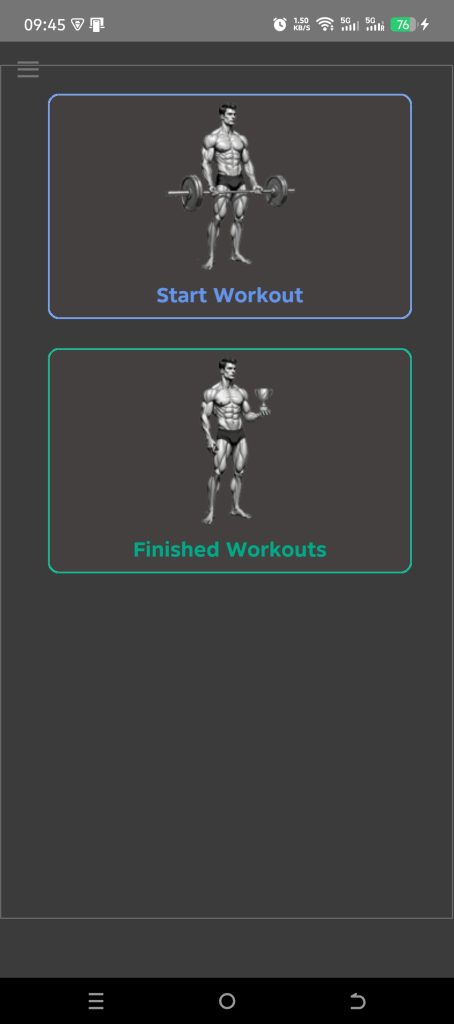
RepJournal 360 is a no-nonsense workout tracker app built for people who actually train — in the gym or in the park. Log every set in seconds, see whether you beat your last session in real time, and never lose a workout, even with no signal. It’s a fast, focused gym tracker and strength training tracker made by a lifter who uses it every single session.
RepJournal 360 is currently in Google Play closed testing. Sign up using the form above to get early access.
Train anywhere — fully offline, then sync
RepJournal 360 is an offline workout tracker first. A basement gym, a hotel room, an outdoor park with no signal — it doesn’t matter. Everything you log is saved on your device instantly, with zero waiting. When you’re back online, your data syncs to the cloud automatically, so your workouts are always backed up and ready on your next login.
Built for the gym and the park

Whether you load a barbell or hang off a bar, RepJournal 360 has you covered. Pick your muscle group from a clear set of anatomical figures, then choose an exercise — each one shows a colour-coded equipment badge (Barbell, Dumbbell, Cable, and more) and, where relevant, the exact muscle head it targets.
- Bodyweight workout tracker: for push-ups, pull-ups and dips, the app uses your registered body weight automatically — add an Ext. Weight value when you train with a vest, plate or chains, and the total load is always correct.
- Superset tracker: tap Add Superset to chain exercises back-to-back and switch between them with the tabs.
- Powerful filters: search by word fragment, by equipment, by muscle head, or switch between All Exercises, My Exercises and New to Me to find the right movement fast.

Log every set in seconds
Logging shouldn’t slow down your workout. RepJournal 360 keeps each exercise on its own tab, so you can jump between movements without losing a thing. Enter your weight and reps with quick plus/minus steppers, then tap Save Set — done.
- Copy from Last Set — repeat the same weight and reps with one tap.
- Copy from Prev. Exercise — perfect for supersets at similar loads.
- Clear — reset both fields instantly to start fresh.
- A built-in rest timer counts up from your last saved set, plus a total exercise timer — so your sets and reps and your recovery stay on track.
- Track Your Personal Best — Progress Chart (see below)
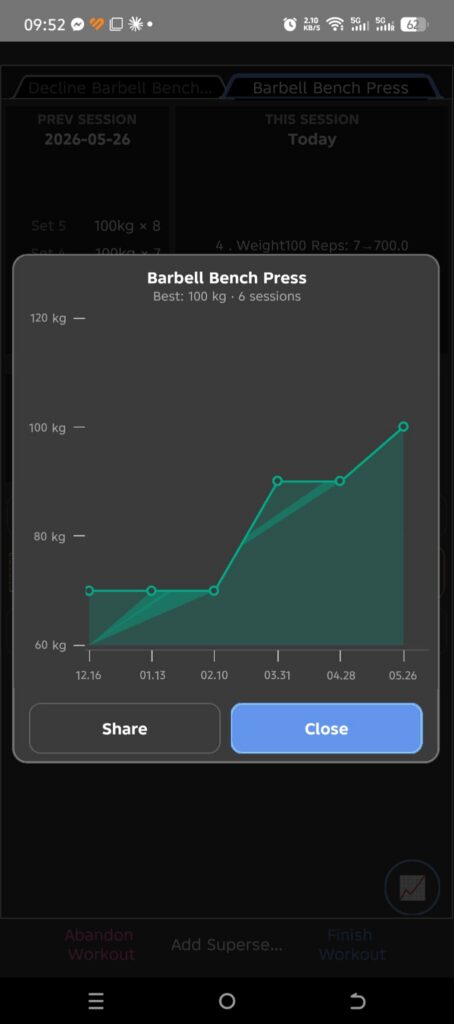
Track Your Personal Best — Progress Chart
See how much stronger you’re getting, exercise by exercise.
While you’re working out, look at the bottom-right corner of the exercise screen. You’ll see a small round button with a little chart icon on it (📈). This is your Personal Best Progress button.
What does it do?
Tap the button, and a window pops up showing a graph of your progress for that specific exercise — for example, if you’re doing Barbell Bench Press, the graph shows only your Bench Press history, not any other exercise.
The graph plots:
- Along the bottom (left to right): the dates you did this exercise, from your earliest session to your most recent one.
- Going up the side: the weight you lifted.
Each dot on the line represents one training day. The dot’s height shows the heaviest weight you successfully lifted for that exercise on that day. If the line is going up and to the right, you’re getting stronger — that’s the whole point!
A few things to know
- Only past sessions are shown. Today’s workout — the one you’re currently doing — is not included in the chart. The chart only updates with your next workout, once today’s session is finished and saved. This way the graph always shows a clear picture of where you stood at the start of today, not a half-finished session
- If you’ve never done this exercise before, the window will simply tell you there’s no history yet, instead of showing an empty or broken chart.
- If you’ve only done the exercise once, you’ll still see a single dot on the graph — it won’t be blank, it just won’t have a line yet since there’s nothing to connect it to.
- Bodyweight and assisted exercises are handled correctly. For exercises like pull-ups or assisted dips, the app factors in your body weight, so the graph reflects the real effort involved, not just the extra plates you added.
- The weight shown matches your preferred units (kilograms or pounds), based on your account settings.
Sharing your progress
Underneath the graph, there’s a Share button. Tapping it lets you save and send a picture of your progress chart — to WhatsApp, email, social media, or anywhere else you’d like — along with a short message and a link to the app, so you can show off your gains or invite a friend to join you.
Why this is useful
Instead of scrolling back through old workout logs trying to remember your best lift, one tap shows you the whole story at a glance — whether you’re making steady progress, plateauing, or ready to push for a new personal record.
See your progress while you train
This is where RepJournal 360 helps you track progressive overload instead of guessing. The screen splits in two: Prev Session shows the weight and reps from the last time you did this exercise, and This Session shows today’s sets in real time — side by side.
Every set row is colour-coded for instant feedback: green means you beat the same set from last time, red means you came up short. You always know — at a glance — whether you’re getting stronger. Hit a new best and the app celebrates it as a personal record (PR), so progressive overload becomes something you can actually see.
Logging in is just as quick: enable biometric login and open the app with your fingerprint or face — no typing your email and password every time.
Every workout, summarized
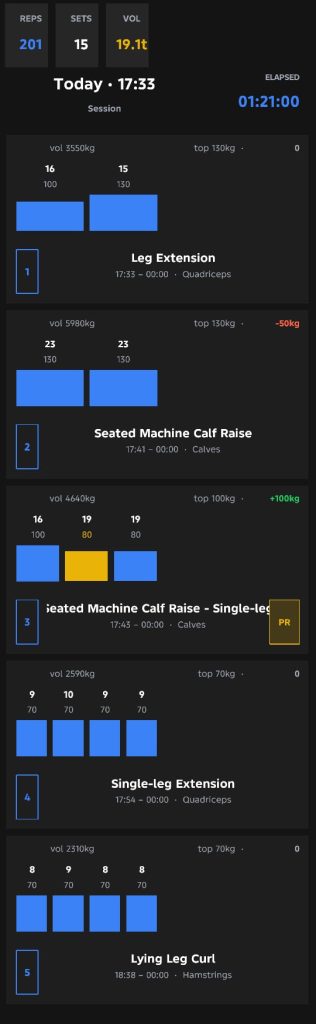
Finish a session and you get a clean summary you can actually use: total reps, total sets, and your total training volume shown in tonnes, alongside the date and how long the workout took.
Each exercise gets its own card with a per-set bar chart — reps above each bar, weight below — plus a change indicator versus your last session for that exercise. Beat your all-time best and the bar turns gold with a PR badge. Tap Share to send your results straight to WhatsApp, Instagram, email or any app on your phone.
Pick up right where you left off
Every muscle group and exercise shows the date you last trained it, so planning your next session takes seconds. See what’s overdue, open your workout history, and keep your routine moving forward.
Who it’s for
RepJournal 360 is for anyone who takes training seriously — gym lifters chasing progressive overload, calisthenics and park athletes tracking bodyweight progress, and everyone in between, at any level. It’s also a great fit if you’re staying strong over 40 and want proof that you’re still improving.
How it works
- Start a workout from the main screen.
- Pick a muscle group and exercise — filter by equipment or muscle head to find it fast.
- Log your sets and watch the green/red coding tell you if you’re beating last time.
- Add supersets and switch between exercises with tabs.
- Finish & review your summary, spot your PRs, and share it.
Frequently asked questions
Does RepJournal 360 work offline?
Yes — with one simple rule: you need a connection when you open the app (to log in and sync) and when you finish your workout (to save it to the cloud). Everything in between requires no internet at all. In practice: open the app at home or outside, let it sync, then head into the gym — even a basement with no signal. Log every set as normal. When you’re done, step outside to where you have mobile data and tap “Finish Workout.” Your session syncs instantly.
Is my workout data backed up?
Yes. Everything is stored on your device and synced to a secure cloud database, so your workout history is safe and available when you log in.
Can it track supersets and bodyweight exercises?
Both. Add a superset with one tap and switch between exercises using tabs. For bodyweight movements the app uses your registered body weight and lets you add extra resistance, so your total load is always accurate.
Does it help with progressive overload and PRs?
That’s the core of it. The side-by-side Prev Session vs This Session view, the green/red set coding, and automatic personal-record detection make it easy to keep adding weight and reps over time.
What languages does the app support?
The interface is multilingual, and you can switch languages and set your preferred date format right from Settings. It currently supports English and Spanish, and I will extend it to other languages on demand. If anyone is willing to help with translations into other languages, they will receive lifetime Pro version.
How do I get RepJournal 360?
The app is currently in Google Play closed testing. Sign up with the form below to join the early-access group and be among the first to use it.
Join the RepJournal 360 early-access test
Be one of the first to train with the fast, offline-first workout log app built for serious lifters. Spots in the closed test are limited — sign up now and we’ll get you set up.